

Contributor
•
7 Messages
4k underscan issue channel 104
I have a 75 inch X90CJ (purchased at Costco). I specifically bought the TV so I could watch more 4k content on Directv through channels 104, 105, etc.
When I watch the Directv 4k live channels (for example 104) - The 4k signal from Directv does not fill the screen - there is a very thin, bright white line on the far right side of the screen. If I adjust the settings on the 4k genie box to max out at 1080P resolution, the line goes away. I'm fairly certain this is some type of 'over/under scan' issue. It is unique to the dedicated Directv 4k channels (occurs on all of them). It does NOT impact VOD 4k from Directv or any other 4k content from any of the other Apps on the television.
Here is what I have tried:
- Spent multiple hours with Sony technical support and escalated Directv support. Sony has given up, referred me back to Directv.
- Switched out cords, reset Directv genie 4k receiver, swapped out the Directv genie 4k receivers (I have two).
- This is my 2nd Sony TV, other one was returned due to a pixel / shadow issue - but this problem happens on both.
- Advanced picture settings don't matter, whether on 'automatic', enhanced, or Dolby - problem is consistent.
- The one setting I think might help me adjust the 'overscan' is greyed out on the Sony menu and I cannot adjust it due to 4k signal picture. Sony explained it has to be adjusted on the Directv side as it is a 'signal' issue from Directv.
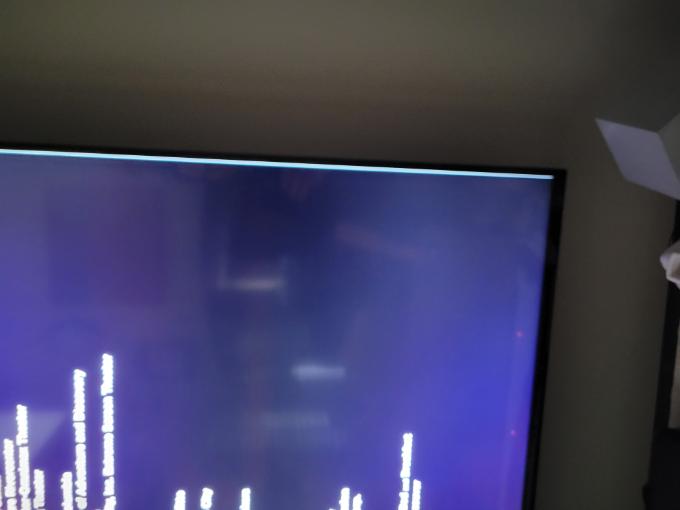
Any ideas? I've attached a photo of the issue (image is sideways, white line / underscan is down right side of television). So disappointing because my whole purpose for upgrading to 4k Directv equipment and purchasing a 4k television was to enjoy the 4k programming. Thanks in advance.
Accepted Solution
rjh227
Contributor
•
7 Messages
4 years ago
Fixed! Bright white edge line is gone - had messed with every Directv setting except the following:
Menu
Settings
Display
Video
Bar Color
Black (not Gray or Dark Gray)
0
0
goldw1800
ACE - Professor
•
2K Messages
4 years ago
Check you "NEW" TV settings --Look under HDMI and set the HDMI ports for "ENHANCED" if that doesn't work try setting the screen to "wide" mode.
I have a Sony 80j and the whit line is there (as you describe) however it does go away after a short time -Not always there on mine -and just like you say only live 4K -everything else is fine --so it may not be your TV but D*TV issue
IF that fails COSTCO has a Great return policy --I would try another Sony (swap it out) at Costco
(edited)
0
litzdog911
ACE - Sage
•
46.7K Messages
4 years ago
The "overscan" setting would be the ticket. I'm puzzled that it's greyed out on your TV during 4K video mode. It's probably an internal adjustment.
0
rjh227
Contributor
•
7 Messages
4 years ago
@litzdog911 Yes, I went the rounds with Sony on this. That 'picture' settings cannot be adjusted with a live 4k feed from Directv. The Directv 4k signal overrides the ability to adjust that.
0
0
rjh227
Contributor
•
7 Messages
4 years ago
@goldw1800 - Thanks for the reply, yes, initially by setting that setting to 'enhanced' I thought that fixed the issue. But what it actually did was 're-set' the Directv settings and 'un-checked' the 4k settings and maxed out at 1080. As soon as I re-set the Directv picture settings to 4k the line always shows up.
The fact that you see it on a different Sony model is interesting to me. When you say it disappears after a bit, can you tell if that's just because the 'content' on the screen is lighter? On mine it is constantly there, but is obviously brighter if the 4k programming is not 'white'.
I'd love to stick with Sony but maybe the answer is a different manufacturer if Directv won't fix it.
0
goldw1800
ACE - Professor
•
2K Messages
4 years ago
It's Not just a "SONY" issue "search the web" I found on my oled and I'm using a Sony 1070 Avr in the mix --the line disappears and it's not always there --making it as you say D*TV issue that may or may not be addressed --I have a 65 sony LCD 4K (2017) that never displayed the "white line" it may only affect a larger display
0
0
DIRECTVhelp
Community Support
•
255.7K Messages
4 years ago
Hey @rjh227 we want to help you enjoy the best of our programing at high quality.
Let's meet in a Direct Message to take a closer look. Please check your DIRECTV Message Inbox (It's the chat icon next to the bell icon in the upper right corner of the Forums).
Elizabeth, DIRECTV Community Specialist
0
0
rjh227
Contributor
•
7 Messages
4 years ago
Yeah, I'm wondering the same thing - maybe it is specific to the 75 inch 4k sets. Ugh. Anybody have any ideas how to get ahold of a real person in escalated level 2/3 technical support with Directv? I went the customer service route and was told I had an 'escalated' ticket and would receive email notifications but never did. I'm willing to try pretty much anything at this point to fix.
0
0
goldw1800
ACE - Professor
•
2K Messages
4 years ago
File that under the Check is in mail
0
0
litzdog911
ACE - Sage
•
46.7K Messages
4 years ago
I wouldn't hold my breath expecting a solution from DirecTV.
0