

New Member
•
9 Messages
I moved and now I cannot watch TV via my computer or app
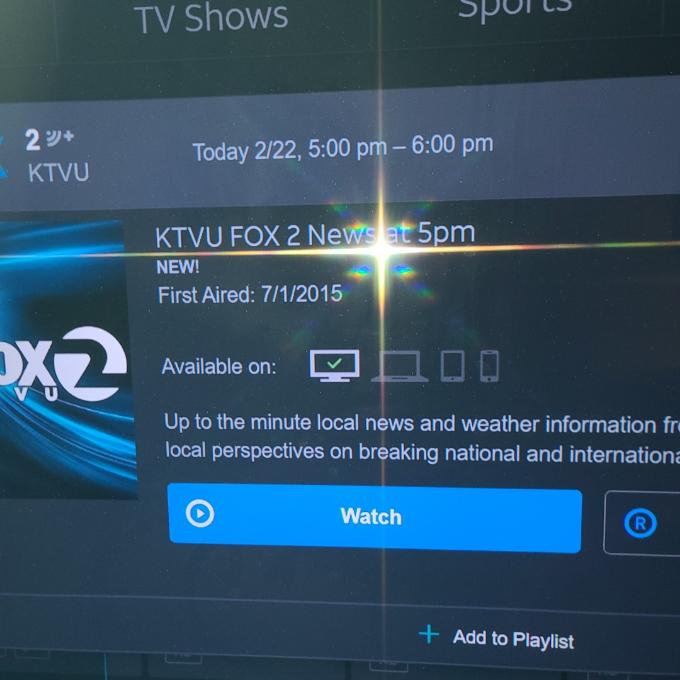
I've been a customer for 20+ years...I move and transfer my service to a new house and now I cannot watch tv via my computer or app., I tried to call TECH support and that was the WORST experience I've ever had and he did a screenshare with me and he could see the option for computer and app is now greyed out. He gave me a ticket number (
direct TV : Agent name dominic : m66868077) and I sstill haven't received a call. This has nothing to do with my computer/cell phone or internet...look at the attached pic...the option has been removed from my account. This should be simple to fix or explain, but this has become a circus! Is DirectTV tryin to force me in renting another box...PLEASE HELP THIS IS RIDICULOUS
Accepted Solution
Juniper
ACE - Expert
•
23.4K Messages
3 years ago
Fair enough if practically all channels are affected. I would log into your account and do a refresh of your services www.directv.com/refresh along with a red button reset of your receivers (main Genie first before any Mini Genie Clients or other receivers).
If that doesn't work, then I would consider a BBB complaint as over the phone doesn't have much support for the secondary streaming perks and you've done everything they would ask (that I can tell). At this point I suspect an issue between the new app and the migration of DirecTV spinning off to a separate company for management, so either they need a global fix or have to address it on a case by case basis.
0
Accepted Solution
jljohns_jr
New Member
•
9 Messages
3 years ago
@Juniper THANK YOU!! I filed a complaint with the the BBB and they quickly resolved my issue. The problem: The ATT account is not setup for online/app viewing. They had to recreate my account on the directTV side and remove the ATT account and now everything is working. A caution to all -- do not bundle your accounts to ATT.
(edited)
0
0
jljohns_jr
New Member
•
9 Messages
3 years ago
Ans its ALL channels except HBO....I've always used this feature in my office or when on the go
0
0
jljohns_jr
New Member
•
9 Messages
3 years ago
Here is the app error
0
0
Ludwick577
ACE - New Member
•
3.6K Messages
3 years ago
Did you change your billing zip code with the credit card on file with Dtv Stream?
(edited)
0
0
jljohns_jr
New Member
•
9 Messages
3 years ago
same zip code...same city
0
0
Ludwick577
ACE - New Member
•
3.6K Messages
3 years ago
Are you talking about Dtv Satellite service?
(edited)
0
0
jljohns_jr
New Member
•
9 Messages
3 years ago
Yes hopefully my screenshots show that...my Tvs are working fine
0
0
bcbsncjlj
Expert
•
6.5K Messages
3 years ago
Moving to DirecTV Satellite forum.
0
0
detuch254
ACE - New Member
•
5.2K Messages
3 years ago
It looks like you are still using the older app. Go to the Google Play Store and look for the updated DIRECTV app. If your phone does Not Support it, you’ll need another device to stream properly.
0
0
jljohns_jr
New Member
•
9 Messages
3 years ago
App updated same results. This is not an equipment or internet browser problem. I've been using the app and the browser for years and no issues. I moved to a new home, DirectTV made some changes to my account to add The genie and DVR and now the option to watch online is grey out and missing from my account...the screenshot clearly shows this as the option for online or app is no longers checked. (SIGH)
0
0
Juniper
ACE - Expert
•
23.4K Messages
3 years ago
Some channels have been changing their online permissions. They catch up with system updates.
I would check with your local Fox station to see if they still permit their channel/specific content through online or mobile streaming through DirecTV website/app or if they will only allow it on their platforms (using DirecTV credentials of course). Something to check in case it is not a technical issue but working as intended from recent updates.
0
0
jljohns_jr
New Member
•
9 Messages
3 years ago
Thanks Juniper. The screenshot is an example...it is the same for ALL channels except HBO. I don't think ALL channels would stop broadcasting online
0
0
JowJow
New Member
•
32 Messages
3 years ago
WOW, am having the same issue after I was updated to the Genie 2, I lost 85% - 90% of my channels online and in app as well. Same exact thing as well, no option to stream just shows the tv like your example. in the app it either says I'm not subscribed or some message about a contractual obligation. When I got the Genie 2 installed on Dec 15th I called in the issue and it was fixed 2 days later, I had to refresh my genie 2 the first week in February and all the same channels went out again. Several calls since then and nothing, no call back, no communication and several escalations. This is beyond frustrating; I feel your pain. I'm in the same boat as you, I literally don't know what to do, I've spoken to several technical support agents and Managers when I requested one and nothing. And yes, CS is the worst I've ever delt with.
0
0
Juniper
ACE - Expert
•
23.4K Messages
3 years ago
Happening after "upgrading" (downgrading for many of us) to the Genie-2 (HS17) further indicates something didn't provision correctly. In my experience, their system has tied all the features that cover the account (system line items) to the "Primary" receiver. Since the Genie-2 functions as the only receiver (only allows Clients on the account) those features should migrate over to on the system side.
I would call DirecTV back and try one final attempt over the phone. At this point say "cancel" at the voice prompt since cancellation/retention agents are usually more expeirenced. Have them (or their supervisor) verify if all system line items are showing on the Genie-2 or if they have to manually turn any back on. If they find anything that needs updating and fix it themselves, allow for at least 48 hours for it to provision to other systems.
If they cannot fix themselves, or submit an internal ticket for IT to do further research, then I would go with a BBB complaint. That kicks it up to the corporate level.
0
0