

Tutor
•
7 Messages
RVU stopped working
I'm stumped.
I have a DirecTV Genie w/ antenna adapter on my network.
I have two Samsung TVs, w/ RVU.
Up until Monday, everything had been fine for several years.
Monday, my terminal adapter pooped out, and AT&T (internet provider) sent over a new Arris BGW-210. I swapped out the Arris units, and everything is working, except one of the RVU tv sets, a Samsung UN65HU8550.
Here's the oddball part:
The "bad" set can still connect to the RVU server. It will display the DirecTV channel banner, but no preview in the upper left corner. It will display the DirecTV guide, but not play any of the shows that I've recorded. It will show that it's playing, display the banners, and the FF/RWND at the bottom, but black screen, and no audio.
So far, I've done the following:
Reset the DirecTV Genie (HR-54) both through the menu system, and red button reset it
Changed internet jacks on the "bad" tv. In other words, I got a 50' ethernet cable and a coupler, unplugged the ethernet cable from the "good" RVU tv and ran into into the "bad" RVU. Same exact problem. Then, I unplugged the "bad" tv ethernet cable, plugged it into the coupler, and ran it to the "good" RVU tv. The good RVU tv worked fine. So I know it's not the cable, outlet or router.
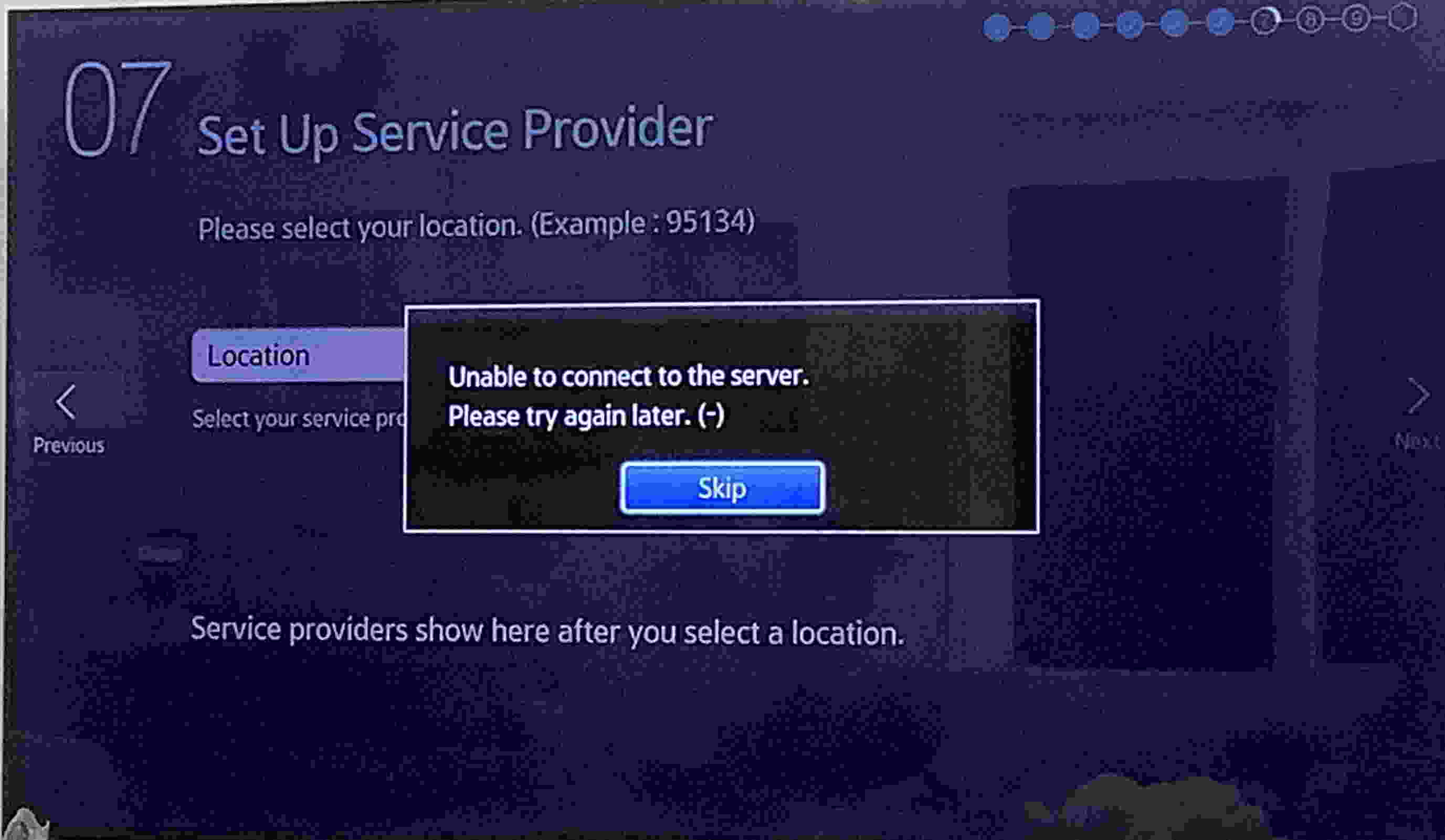
I've reset the "bad" Samsung TV to factory. During the set up process, once you select RVU as an input source, it asks for a zip code, and then to select the provider from a pop up list. I got an error message at this point and had to skip
Checked that both the Samsung and the HR54 had the latest updates, they did
After a few hours of phone support antics, DirecTV / AT&T sent a tech who just scratched his head, says he's just a sub contractor, didn't know why it wasn't working, and left in a huff. Told me to call AT&T on his way out.
AT&T phone support then spent 2 hours having me power cycle everything. They then sent me over to Samsung.
Samsung was laughably incompetent. The first person didn't know what RVU was (and told me this.) Then spent 20 minutes trying to sell me a new Samsung TV.
Another call to Samsung, and I received someone who could at least spell RVU. After a few factory resets, he gave up.
So....
I'm assuming the issue is that it can't select DirecTV as an RVU provider, so copy protection is preventing the video/audio?
Any work around for this?
shannon02
ACE - Expert
•
21.3K Messages
3 years ago
Sounds like the TV RVU went bad. AFAIK nobody is making RVU TVs anymore so you need to call DTV and get a mini client to connect to the TV.
DTV doesn't use your internet to use Whole Home or to work.
0
0
litzdog911
ACE - Sage
•
46.7K Messages
3 years ago
Did your Samsung TV update it's firmware? Does it have the latest updates?
0
0
dlleon
Tutor
•
7 Messages
3 years ago
Yes, the TV has the latest firmware update.
The only thing that changed was the AT&T router.
I'm puzzled because the other RVU Samsung is chugging along fine.
0
0
litzdog911
ACE - Sage
•
46.7K Messages
3 years ago
Are both Samsung RVU TVs connected to your home network the same way? WiFi? Direct ethernet? It would be a pain, but can you swap the location of the two TVs?
0
0
dlleon
Tutor
•
7 Messages
3 years ago
They're both connected to the same router.
I did swap the TVs, same result. The "good" Samsung worked, the "bad" one didn't.
0
0
shannon02
ACE - Expert
•
21.3K Messages
3 years ago
Your router has nothing to do with the RVU function of the TV. RVU just adds in the circuits of a DTV mini into the TV.
0
0
shannon02
ACE - Expert
•
21.3K Messages
3 years ago
It is beginning to sound like you are using an unauthorized RVU setup, so just to make sure do you have a coax from the SWM splitter to each RVU TV that is terminated with a DECA BB that has the Ethernet cable connected to the RVU TV?
(edited)
0
0
dlleon
Tutor
•
7 Messages
3 years ago
It was set up by a DirecTV installer, and I pay for the units, so I'm not sure why it wouldn't be authorized. I also (with DTV support) deauthorized the unit and reauthorized it. It accepted the PIN. It still shows the DTV menus and channel banners, just no video.
As for the adapter, neither TV has a Deca. Just ethernet. DTV support said the Deca wasn't needed. It's been working without one for several years, and the second Samsung TV is still working without it.
I'm thinking it's the RVU software in the TV looking for a web hook that moved.
I still have one of the Deca units around here. If you think it would help, I can hook it back up. I don't know if there's still a SWM in the attic, but I can find out tomorrow.
(edited)
0
0
shannon02
ACE - Expert
•
21.3K Messages
3 years ago
DTV has never allowed using the internet to connect RVU TVs, they only used their own coax and DECCA BB that have a power supply either a USB or power brick so don't know why that tech didn't do it that way and since it is not connected correctly there is no way to know where or what the problem is.
0
0
Juniper
ACE - Expert
•
23.4K Messages
3 years ago
The TV's should have an adapter to the coax for DirecTV. If they are only connected to your internet router, there is the problem. They were not designed to connect through ineternet equipment, as satellite service does not require internet. Unforutnately some techs tried to do it that way to save themselves time from doing it right.
You may need to schedule a service call to set that up correctly. However, if it does get to that point, I would suggest an actual DirecTV box on the TV. This is because RVU was never well supported, TV makers are slow on updates and can stop as they want to sell newer TVs, and historically they are slower to process RVU as opposed to a dedicated box. There is no difference in monthly cost as you are paying the $7 for each authorized TV regardless of what box is connected to it or even RVU which is no box of its own.
(edited)
0
0
dlleon
Tutor
•
7 Messages
3 years ago
@shannon02 I have a Deca box with a power supply (though I think it gets power directly from the Genie.)
Would I just slap one end on the Genie, plug the Genie's ethernet into the Deca, and then do the same in the room with TV?
0
0
shannon02
ACE - Expert
•
21.3K Messages
3 years ago
There needs to be a coax from the SWM splitter to the RVU TV then the powered DECA BB is connected to the coax and the power brick is connected to the whip end or the USB powered one is connected to a USB port, then its Ethernet port is connected to the RVU TVs Ethernet port. The Genie sends the packet info on the coax and the DECA BB removes it to be used by the RVU TV.
(edited)
0
0
dlleon
Tutor
•
7 Messages
3 years ago
Thanks. I hooked it up, but the network light on the Deca was flashing. Do I need to enable it somehow?
0
0